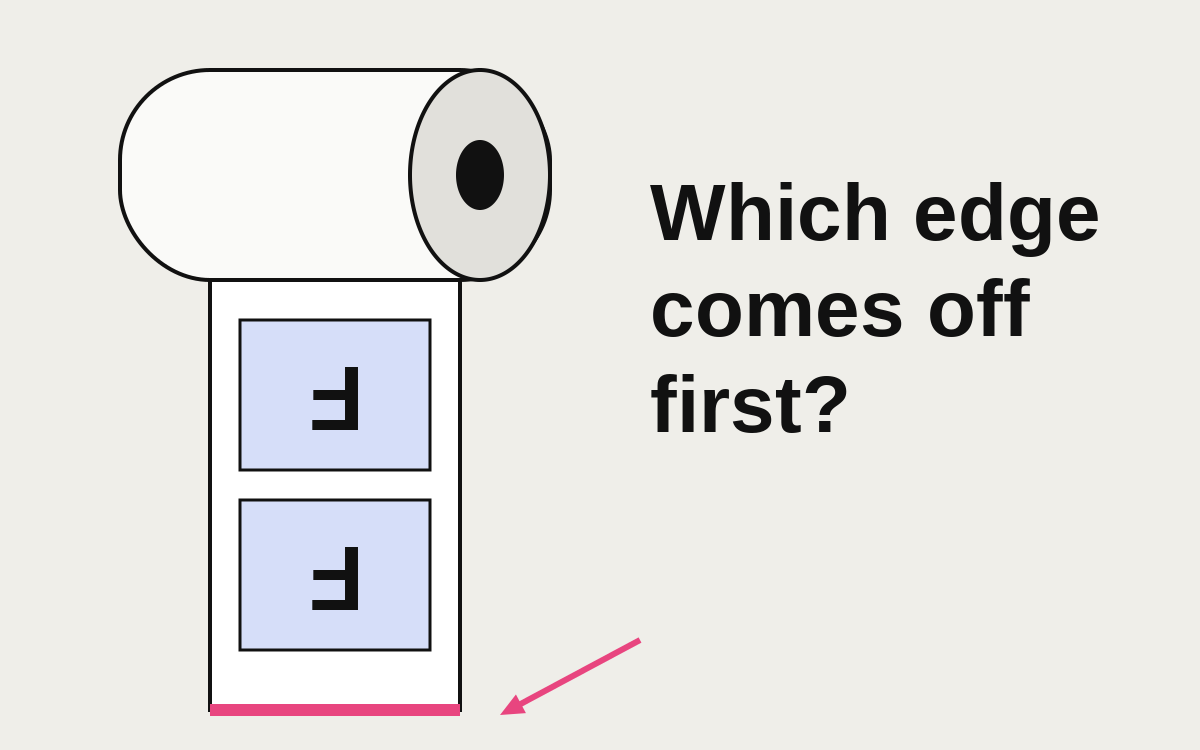
Unwind direction (also called wind direction or copy position) describes which edge of the label comes off the roll first, and whether the labels are on the outside or the inside of the roll. Most printers use a chart numbered 1 to 8: positions 1 to 4 are wound with the labels on the outside, 5 to 8 on the inside, and within each group the number tells you whether the top, bottom, right or left of the label leads. If you apply labels by hand, the choice is mostly convenience. If a machine applies them, the machine decides, and the wrong position means a reprint or rewind.
The standard chart
Most label printers in North America use a chart like this. Imagine holding the roll with the loose end of the label strip coming toward you off the top of the roll.

| Position | Labels wound | Edge that comes off first |
|---|---|---|
| 1 | Outside | Top of the label |
| 2 | Outside | Bottom of the label |
| 3 | Outside | Right side of the label |
| 4 | Outside | Left side of the label |
| 5 | Inside | Top of the label |
| 6 | Inside | Bottom of the label |
| 7 | Inside | Right side of the label |
| 8 | Inside | Left side of the label |
One important caution: printers don't all draw the chart the same way, and some swap positions 3 and 4 (or 7 and 8) depending on how they define "right" and "left". Always choose from the diagram your own printer supplies, and when in doubt, describe what you need in words as well as the number: "outside wound, text reading upright as it comes off, left edge leading."
Outside wound or inside wound?
Outside wound (positions 1 to 4) means the printed face of the labels is on the outside of the roll, where you can see it. It's the default for most hand application and for many applicators.
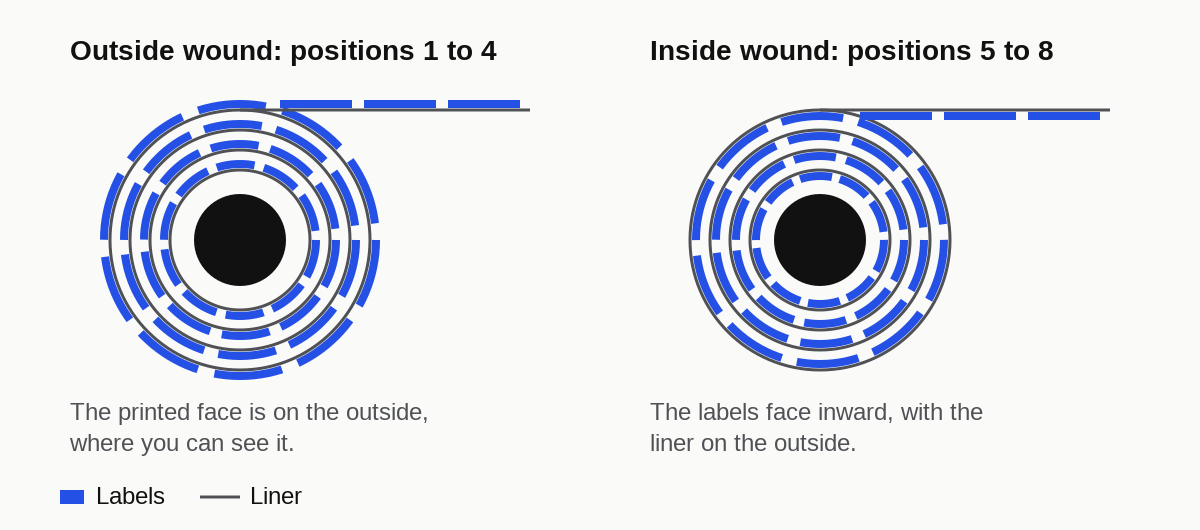
Inside wound (positions 5 to 8) means the labels face inward and the liner is on the outside. Some applicators and some desktop label printers need this, and it's sometimes used to protect labels from scuffing in transit.
If you have no machine and no preference, outside wound is the usual choice.
How to choose
Applying by hand
Choose whatever makes the label easy to read as you peel it. People often pick position 1 or 2 for labels that go on flat surfaces like boxes and bags, and position 3 or 4 for labels that wrap around a bottle or jar, so the label comes off sideways, ready to wrap. A desktop dispenser may have its own requirement, so check it.
Applying by machine
Don't guess. The applicator's manual or the person who runs it will specify the position, and sometimes the core size and maximum roll diameter too. Wrap-around bottle applicators typically need a side-leading position (3 or 4, or 7 or 8 inside), because the label is fed onto the container along its length. Which side depends on the direction the bottles travel.
A quick way to confirm: take a roll that already works on the machine, hold it as described above, and match it to your printer's chart.
Printing on the labels yourself
If you're overprinting dates, batch codes or prices with a thermal transfer printer, that printer has requirements too: often a specific core size, a maximum roll diameter and a particular winding. Check them before ordering.
The other roll specifications
Unwind direction is one of several details the printer needs. Missing any of them can make an otherwise perfect run unusable.
- Core size. The inside diameter of the cardboard tube. 1 in, 1.5 in and 3 in are common; desktop printers often use 1 in, and many industrial applicators use 3 in.
- Maximum roll diameter (OD). The largest the finished roll can be to fit your dispenser or machine, which in turn limits labels per roll.
- Labels per roll. Easier to count and inventory if it's a round number that suits your batch sizes.
- Gap between labels. Commonly about 0.125 in (1/8 in) along the roll. Applicators sense this gap to position each label, so they may need a specific minimum.
- Labels across. Whether the roll is one label wide or several side by side. Hand applicators and most machines want one across.
- Liner. Paper or film. Film (PET) liners are thinner and stronger, which some high-speed applicators prefer.
What it means for your artwork
You design the label upright, as the customer will read it. You don't rotate the artwork to match the unwind direction; the printer handles orientation when they set up the press and rewind the rolls. Rotating it yourself is a common way to end up with labels that are wrong by 90 or 180 degrees.
What you do need to get right in the file:
- The label sits on the printer's dieline, at the exact size and corner radius they supply. Our page on artwork that doesn't fit the dieline explains the setup.
- Bleed past the cut, usually about 0.0625 to 0.125 in for labels.
- The die line on its own layer in a named spot color, set to overprint, so it never prints.
- Barcodes clear of edges, on a flat part of the container, at a scannable size. A barcode that wraps around a small bottle can fail even if it's the right size; our page on barcodes that won't scan gives the minimums and the trick of turning it sideways.
- White ink set up as a separate layer if you're printing on clear or metallic film.
A checklist to send the printer
Copy this into your order or email:
Label size (on the cut):
Corner radius:
Material and finish:
Quantity:
Labels per roll:
Core size:
Maximum roll diameter:
Wound: outside / inside
Unwind position (from your chart):
Applied: by hand / by machine (model, if known)
If a machine is involved, attach a photo of a roll that already works on it, with the label strip pulled out a little. It removes almost all room for misunderstanding.
When it goes wrong
A run printed in the wrong position isn't always wasted. Labels can be rewound to a different position on a rewinder, and many printers will do it for a fee. That works for changing from outside to inside wound or from one leading edge to another. It doesn't help if the artwork itself was rotated in the file or the labels were printed several across when you needed one.
The roll specification is a conversation with your printer. Once it's agreed, we can put the label artwork on their dieline for a fixed $78 through our packaging and label service.
FAQ
What does unwind direction mean on labels?
It describes how labels come off the roll: whether they're wound with the printed side facing out or in, and which edge of the label (top, bottom, left or right) comes off first. Printers number the combinations 1 to 8 on a chart, and the right one depends on how the labels will be applied.
What is the most common label unwind direction?
For hand application, outside wound with the top or a side leading (positions 1 to 4) is most common. For machine application there's no common answer: the applicator determines the position, so check its manual or a roll that already runs on it.
Should I rotate my label artwork to match the unwind direction?
No. Supply the artwork upright, the way people will read it on the product, and tell the printer the unwind position. The printer sets up the press and rewinding to deliver the labels in that orientation.