A useful print brief answers ten questions: what the piece is, its finished size, who's printing it, the quantity and paper if known, the deadline for files, the final text, the logo and images you have, the colors and fonts you use, one or two examples you like, and who approves it. It fits on a page. You don't need to describe the design itself in detail. What saves the most time is sending final text and the printer's specification before work starts, because changes to either are what turn one round of revisions into four.
Why print briefs need more than design briefs
A screen graphic can be resized and re-exported in minutes. A print file is tied to a physical size, a paper, a press and sometimes a cutting die. A designer who doesn't know those things has to guess, and a wrong guess usually means rebuilding the file rather than tweaking it.
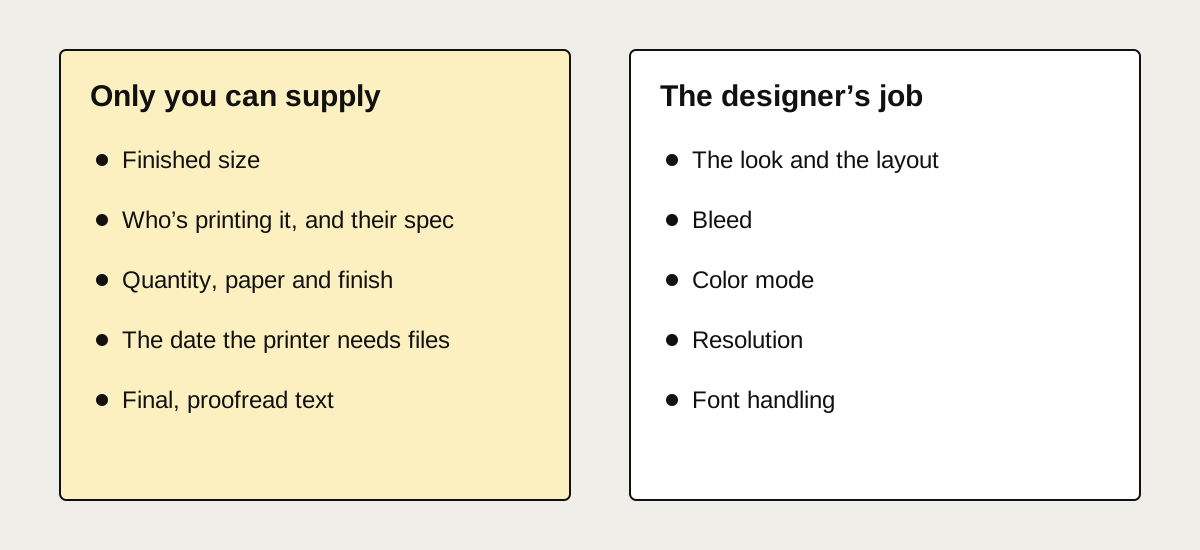
The design itself (the look, the layout, the mood) is the part designers are good at drawing out of a short conversation. The production facts are the part only you can supply.
The ten things to include
1. What it is and what it's for
"A tri-fold brochure for a dental clinic's new implant service, handed out at reception and mailed to past patients." One sentence covering the object, the audience and where it's used tells a designer far more than a page of adjectives.
Add the single thing you want the reader to do: call, book online, scan a QR code, come to an event. Everything on the page should serve that action.
2. The finished size
The size after trimming, in inches or millimeters, and the orientation. If you don't know, say what it is ("standard business card", "folds to fit a #10 envelope") and the designer will confirm the size with you. Size decided late is one of the few things that forces a layout to start over, because stretching a finished design to new proportions distorts it.
3. Who's printing it
The printer's name, or a link to the product page, or their spec sheet if they sent one. Printers differ on bleed, color setup, file format and how they want finishes, and a file built for one may need adjusting for another. If you haven't chosen a printer yet, say so, and ask for a file built to common specifications.
4. Quantity, paper and finish (if decided)
"500, 16 pt matte with spot UV on the logo" changes the design: a finish needs its own layer, and some stocks change how colors look. If these aren't decided, the designer can suggest options, but tell them the budget range so the suggestions are realistic.
5. The date the printer needs files
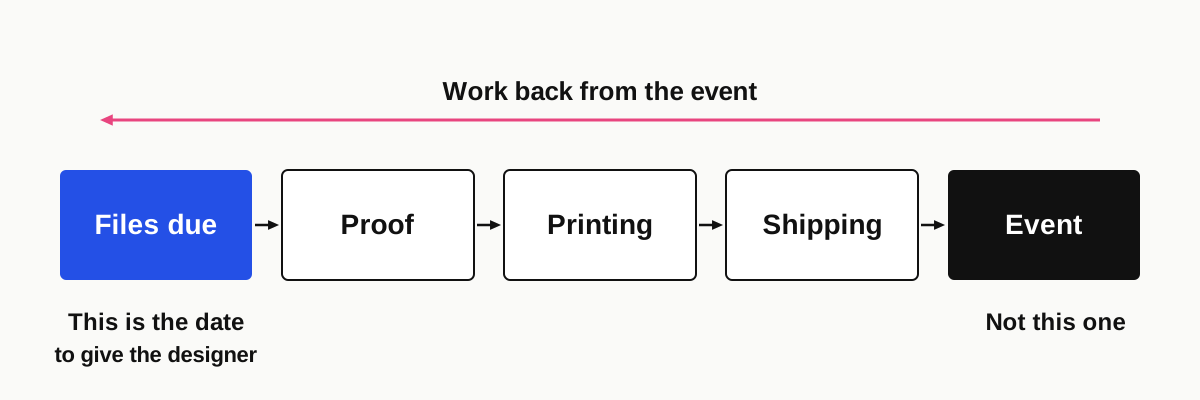
Not the date of the event. Work back from it: printing and shipping take time, and the printer may need a proof approved before production. Give the designer the file deadline.
6. Final text
This is the big one. Send every word that will appear, proofread, in a document or email: headings, body copy, prices, opening hours, phone numbers, legal lines. Mark anything that isn't confirmed yet.
Layout depends on text length. A headline that grows from four words to nine, or a menu that gains six dishes after the layout is built, usually means rearranging the whole page.
7. Logo and images
Send the best logo file you have, ideally a vector (AI, EPS, SVG or PDF). If all you have is a small JPG, send it anyway and say so; it may need redrawing as a vector before it will print sharply.
For photos, send the original files, not images saved from a website or WhatsApp, which are compressed. Say which photos you own or have licensed. If you're not sure a photo is big enough, send it anyway and ask.
8. Brand colors and fonts
If you have brand guidelines, send them. If not, the HEX or Pantone values from your website or past print jobs, and the names of any fonts, are enough. A photo of something printed that you were happy with is useful too.
9. Examples
Two or three examples of things you like, and one of something you don't, with a sentence on each. "I like how uncluttered this is" is more useful than the example alone. They don't need to be in your industry.
10. Who approves it
The name of the person who signs off. If three people will each have opinions, tell the designer now and collect feedback into one message per round. Conflicting comments from different people are one of the quickest ways to send a design in circles.
A brief you can copy
Piece:
Purpose and audience:
What the reader should do:
Finished size and orientation:
Printer (name, link or spec sheet):
Quantity / paper / finish:
Files needed by:
Final text: attached / to follow (mark what's not confirmed)
Logo files: attached (formats: )
Photos: attached (owned / licensed / need stock)
Brand colors and fonts:
Examples I like, and why:
Something I don't want:
Who approves:
What you can leave out
- A description of the layout. Unless you have a strong idea, leave composition to the designer and judge the first draft.
- Design vocabulary. "Clean", "bold" and "premium" mean different things to everyone. An example says it better.
- Technical print settings. Bleed, color mode, resolution and font handling are the designer's job. You only need to pass on the printer's spec.
- A finished mood board. Two examples with notes beat twenty without.
What causes extra rounds of changes
From the files we receive, the causes are almost always one of these:
- Text arriving in pieces, or changing after the layout is built.
- The size or format changing, from flyer to postcard or portrait to landscape.
- A new decision-maker appearing at the second draft.
- The printer being chosen late, with a spec that differs from what was assumed.
- Feedback that describes a feeling ("it doesn't pop") without saying what to change. Point at the part you'd change and say whether you want it bigger, smaller, darker or gone.
None of these are anyone's fault, but each one costs time. Sorting them before the first draft is the cheapest thing you can do for the project.
When you don't have a brief at all
Sometimes all there is is a photo of last year's flyer and a list of changes. That's still a start. A designer can work from it if you answer the questions above in a short message alongside, and the answers to "who's printing it" and "what's the final text" matter more than everything else combined.
For a new flyer, menu, brochure or card, our design service works from exactly this kind of brief, at a fixed $125 agreed before anything starts; the full list is on our prices page.
FAQ
What should a print design brief include?
The piece and its purpose, finished size, printer or spec sheet, quantity and paper if known, the date files are needed, final proofread text, logo and photo files, brand colors and fonts, a few examples you like and why, and the name of the person who approves the design.
Do I need to know the printer before briefing a designer?
It helps a lot. Printers differ in bleed, color and file requirements, and some products, such as labels and folded pieces, depend on the printer's template. If you haven't chosen one, tell the designer, and they can build to widely accepted specifications and adjust later.
How many revisions should a print design need?
With final text, a known size and one decision-maker, one or two rounds is common. Revisions multiply when text, size or the approver changes after the first draft, so settling those before work starts is the most reliable way to keep a project short.